> ## Documentation Index
> Fetch the complete documentation index at: https://docs.browser.ai/llms.txt
> Use this file to discover all available pages before exploring further.
# BrowserAI task API
The **BrowserAI** API offers developers a powerful interface to launch, control, and collect output from AI-driven browser automation tasks. Built for flexibility, it allows you to automate web actions, gather content, perform scraping, and execute scripts within a cloud-hosted browser—complete with customizable location targeting.
Ideal for **building data pipelines, automating testing processes, or embedding browser automation into your own applications**, this API delivers a robust, secure, and scalable solution for managing complex web-based workflows with ease.
### API Workflow
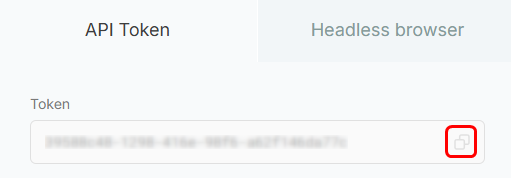
1. Start by retrieving your **API key** from the Project Dashboard.
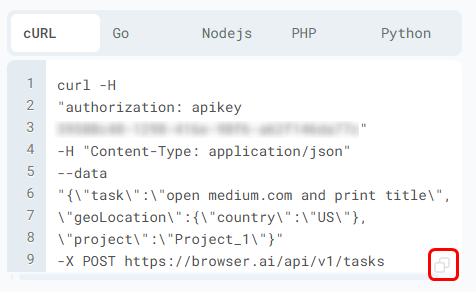
 1. Create a task by either running the provided **cURL command in CMD** or sending a request to the `/tasks` endpoint with your **prompt and location settings**.
 1. If you used the **API endpoint**, you can track the task using the returned `session ID`.
2. You can fetch task **metadata** by calling `/tasks/{session_id}` method and view the response structure similar to this:
```
{
"executionId": "",
"scriptId": "",
"scriptType": "",
"status": "",
"progress": {
"status": "",
"logs": [
""
]
},
"started": "2023-11-07T05:31:56Z",
"estimatedCompletion": "2023-11-07T05:31:56Z"
}
```
1. Once completed, retrieve the **final results** by sending a request to the `/results/{session_id}` method and recieve this output:
```
{
"executionId": "",
"status": "",
"started": "2023-11-07T05:31:56Z",
"completed": "2023-11-07T05:31:56Z",
"results": [
{
"model_output": "",
"result": "",
"state": "",
"metadata": {},
"history_index": 123,
"screenshot_url": "",
"html_url": "",
"console_url": "",
"insert_ts": "2023-11-07T05:31:56Z"
}
]
}
```
Explore more in-depth information about our API [here](https://docs.browser.ai/api-reference/intro)!
1. If you used the **API endpoint**, you can track the task using the returned `session ID`.
2. You can fetch task **metadata** by calling `/tasks/{session_id}` method and view the response structure similar to this:
```
{
"executionId": "",
"scriptId": "",
"scriptType": "",
"status": "",
"progress": {
"status": "",
"logs": [
""
]
},
"started": "2023-11-07T05:31:56Z",
"estimatedCompletion": "2023-11-07T05:31:56Z"
}
```
1. Once completed, retrieve the **final results** by sending a request to the `/results/{session_id}` method and recieve this output:
```
{
"executionId": "",
"status": "",
"started": "2023-11-07T05:31:56Z",
"completed": "2023-11-07T05:31:56Z",
"results": [
{
"model_output": "",
"result": "",
"state": "",
"metadata": {},
"history_index": 123,
"screenshot_url": "",
"html_url": "",
"console_url": "",
"insert_ts": "2023-11-07T05:31:56Z"
}
]
}
```
Explore more in-depth information about our API [here](https://docs.browser.ai/api-reference/intro)!